
How to turn a horizontal video vertical without cropping it
Luma Ray 3.2 Reframe keeps your whole 16:9 frame and generates the missing picture above and below it for 9:16. On LUVI it costs 264 credits per second of source at 720p. Keep each clip to 10 seconds and stay at 720p for vertical, where Luma doesn't offer 1080p yet.
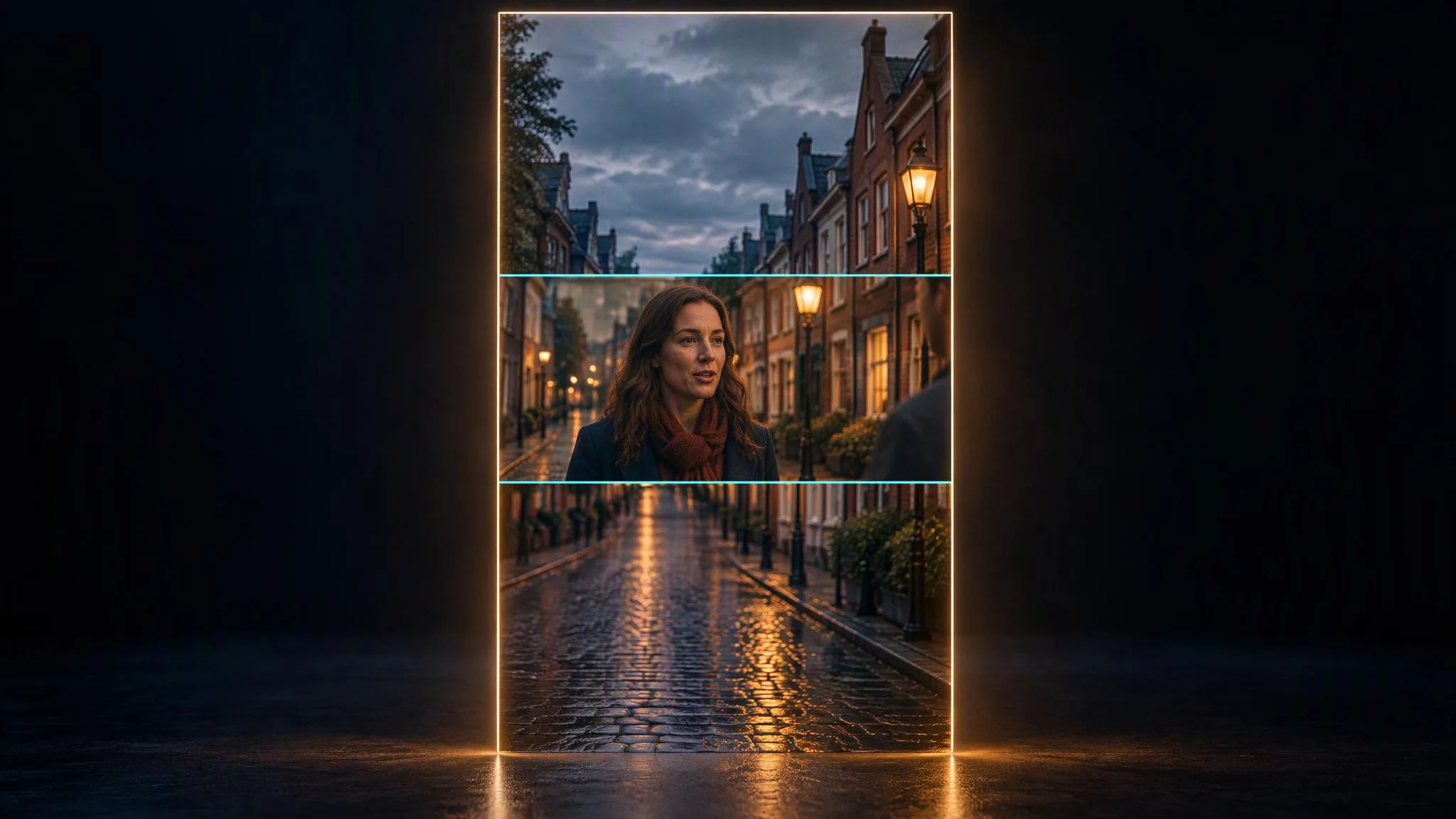
Cropping a 16:9 clip to 9:16 keeps a narrow strip of the frame and throws the rest away. Luma Ray 3.2 Reframe works the other way: it keeps the whole frame and paints in the part of the taller picture that was never filmed. On LUVI it takes your clip, a target shape and a short description, and as of October 20, 2026 it costs 264 credits per second of source at 720p. A five-second clip comes to 1,320 credits. Below: what Reframe does to your footage, the two limits that matter for vertical, and how to write the description.
What does Reframe actually do to the clip?
Reframe outpaints: the original footage stays as it is, and new picture is generated around it to fill the new shape. Luma's documentation describes it as "The source video content is preserved frame-for-frame, and Ray 3.2 fills the newly exposed canvas area around it."
For a horizontal clip going vertical, that means the 16:9 picture sits centered inside the 9:16 frame, and Ray 3.2 invents what lies above and below it: more sky, more floor, more of the room. A plain crop is the opposite trade. A 9:16 window cut out of a 1920×1080 frame is about 608 pixels wide, so it keeps roughly a third of the original width and drops the other two thirds. If the action spreads across the frame, cropping loses it and Reframe keeps it. If the subject sits dead center and the edges don't matter, a crop in any editor is free.
How long can the source clip be?
Keep each source clip to 10 seconds or less. Luma's documentation caps Reframe at 10 seconds for both the source and the output, and suggests splitting a longer clip into pieces of 10 seconds or less and reframing each one.
LUVI's upload slot accepts sources up to 30 seconds, but in our quotes the price stopped growing at 10 seconds: a 5-second source quoted 1,320 credits, and 10-, 15- and 20-second sources all quoted 2,640. Combined with Luma's cap, the safe reading is to cut the clip before you upload it, and not to count on getting more than 10 seconds back.
Which resolution should I pick for vertical?
Pick 720p for vertical. Luma's documentation says 1080p "works for landscape and square aspect ratios" and that vertical targets (9:16 and 3:4) at 1080p are not available yet. LUVI's resolution picker still lists 1080p for every shape, so it's on you to choose 720p, or 540p for a cheap draft, when the target is tall.
Checked on October 20, 2026, for a 10-second source:
- 540p: 1,320 credits
- 720p: 2,640 credits
- 1080p (landscape and square targets only): 7,920 credits
The target shape doesn't change the price.
What should the prompt say?
The prompt describes what belongs in the new space. Luma defines it as "how the new canvas area should be filled," up to 6,000 characters. LUVI's prompt hint asks what should stay in frame, and a good prompt does both: it names the subject to keep and describes the world beyond the original edges. For a 16:9 street interview going to 9:16:
Keep the woman speaking at the center of the frame. Above her, continue the brick building facade and a strip of overcast sky; below her, continue the wet cobblestone pavement with a few fallen leaves. Match the existing light and color.
Describe the space as it would look if the camera had been taller. The model can only invent what you leave room for: a vague prompt gets generic filler, and a prompt that adds a new event above the subject's head will pull the viewer's eye away from the original footage.
Can I choose where the original sits in the frame?
No, not on LUVI. Luma's API has a source_position setting for placing the original anywhere on the new canvas, but LUVI's model exposes only the target shape and the resolution. You get Luma's default, which fits the source into the new frame centered and outpaints the rest. Luma lists six target shapes for Reframe: 9:16, 3:4, 1:1, 4:3, 16:9 and 21:9. LUVI also offers 9:21, which isn't on Luma's list.
How we checked
- Model: Luma Ray 3.2 Reframe on LUVI.
- What was read: the model's parameter contract and live credit quotes on LUVI for 5-, 10-, 15- and 20-second source clips at 540p, 720p and 1080p, LUVI's pricing code for the model, and Luma's reframing documentation.
- Date: October 20, 2026.
- Results: 264 credits per source second at 720p for clips up to 10 seconds, half that at 540p and three times that at 1080p, with longer sources quoting the same as 10 seconds.
- Drawbacks: No outputs were generated for this post, so it makes no claim about output quality, including how convincing the generated top and bottom look, or what LUVI returns for a source longer than 10 seconds.
In LUVI
Open Luma Ray 3.2 Reframe in the Workspace, drop the clip into the Source Video slot, set the target to 9:16 and the resolution to 720p, and write the prompt. The quote above Generate shows the exact price for your clip before anything runs. If you haven't shot the footage yet, it's simpler to generate vertical from the start, since many video models on LUVI offer 9:16 directly.
New accounts start with 200 credits, and verifying a phone and a card adds up to 1,500 more. Create a LUVI account and reframe one five-second clip before you commit a series.
Sources
- Video reframing — Luma AI, Luma Agents API guide. Accessed October 20, 2026.
More from Workflows
- Pose, Shot and Style nodes: a body, a frame and a look added to your promptOn LUVI's workflow canvas, a Pose node adds one of 740 body descriptions, a Shot node one of 600 still compositions and a Style node one of 1,060 Prompt Lab cues to whatever text flows through it. The three nodes are free; you pay only for the generator they feed.
- From lyrics to a finished song in LUVI: MiniMax Lyrics, then Music 3.0 or Suno v6Write the words with MiniMax Lyrics Generation (20 credits), then turn them into a song with MiniMax Music 3.0 (300 credits, one track up to five minutes) or Suno v6 in custom mode (264 credits for two takes). The lyric sheet's section tags carry straight over.
- A music bed for your clip: Suno v6 or MiniMax Music, and the switch that keeps it wordlessSuno v6 returns two takes for 264 credits; MiniMax Music 2.6 and 3.0 return one track for 300, with WAV output. For a bed under a clip, the setting that matters is Instrumental only: MiniMax switches it on when your prompt says instrumental, Suno v6 does not.